
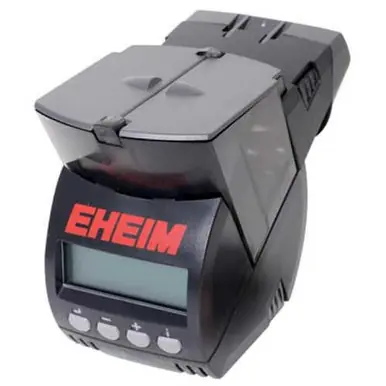
Eheim Dual Digital Aquarium Fish Feeder
Intelligent, automatic fish feeder increases feeding options. Programmable feeder provides the best nutrition for your tropical aquarium fish by dispensing a varied diet. Twin chambers hold different types of fish foods including flakes, granules, sticks, or pellets. Accommodate various feeding levels (surface, mid-water, and bottom) by using sinking pellets, floating fish food, or slow-sinking granules. The two 80 ml capacity chambers can be controlled independently for custom feedings intervals. Uses 4 AA batteries.
Features:
- Large display – all settings are visible
- Permanent display of time
- Permanent display of the feed setting
- Up to 3 feed times in 24 hours
- Up to 9 turns per feed time
- Random feed time available
- “Diet Function” – skips one day every 7 days
- Battery life display (low battery) display
Eheim Dual Digital Aquarium Fish Feeder
Intelligent, automatic fish feeder increases feeding options. Programmable feeder provides the best nutrition for your tropical aquarium fish by dispensing a varied diet. Twin chambers hold different types of fish foods including flakes, granules, sticks, or pellets. Accommodate various feeding levels (surface, mid-water, and bottom) by using sinking pellets, floating fish food, or slow-sinking granules. The two 80 ml capacity chambers can be controlled independently for custom feedings intervals. Uses 4 AA batteries.
Features:
- Large display – all settings are visible
- Permanent display of time
- Permanent display of the feed setting
- Up to 3 feed times in 24 hours
- Up to 9 turns per feed time
- Random feed time available
- “Diet Function” – skips one day every 7 days
- Battery life display (low battery) display
Quick Start Up Guide
- Open Battery compartment. Insert (4) AA batteries, being mindful of the polarity of the batteries.
- Use Velcro® mounts to attach to aquarium.
- Fill the feed compartment. The automatic feeder is suitable for most commercially available fish flakes, sticks, pellets, tablets, and other granular foods. Not for fresh or moist foods.
- Fill the Feed Screws: Press 3 x -/+ buttons (Manual feeding in the Standard Mode).
- Define the Feed Quantity.
Setting the Time
Press the SET button for 3 seconds until the “Hours” flash on the display.
Set the “Hours” with the minus/plus buttons. Confirm by pressing the SET button.
Set the ‘Minutes” with the minus/plus buttons. Confirm by pressing the SET button.
Programming (per day)
- Set “Hours” with the minus/plus buttons. Confirm by pressing the SET button. Set the “Minutes” and confirm by pressing the SET button. Set the number of rotations and confirm by pressing the SET button.
For Random Feeding:
- Use -/+ to set between 23:00 and 00:00 hours to “rnd” function. Confirm by pressing the SET button. The feeder will then dispense food at random between 8:00 and 18:00 hours.
- Set the number of rotations and confirm by pressing the SET button.
- Set feed time for left Feed Screw. Set the “Hours” and confirm by pressing the SET button. Set the “Minutes” and confirm by pressing the SET button. Set the number of rotations for Feed Screw and confirm by pressing the SET button.
Pause Function
When the “Pause” symbol is activated, the unit will ignore programmed feed times for 24 hours after each six-day feeding cycle.
Product code: 929
Item No. FO-FF200-D
Reviews
There are no reviews yet.